
Complete KYC Verification
Identity verification guide
KYC verification is required before you can participate in token sales on AttentionPad.
AttentionPad uses Shufti Pro, a third-party identity verification provider, to complete the verification process. The verification flow helps confirm that each participant is a real person and supports a safer, more compliant launch environment for all users.
Why KYC Is Required
KYC, or Know Your Customer, is an identity verification process used to confirm a user’s identity before allowing access to regulated or compliance-sensitive platform features.
On AttentionPad, KYC verification is mandatory for users who want to participate in token sales. If your account is not verified, you may still be able to browse the platform, but you will not be eligible to join token sales until verification is complete.
KYC helps protect the platform, projects, and participants by reducing fraud, duplicate accounts, abuse, and unauthorized participation.
Step 1: Open Your Profile
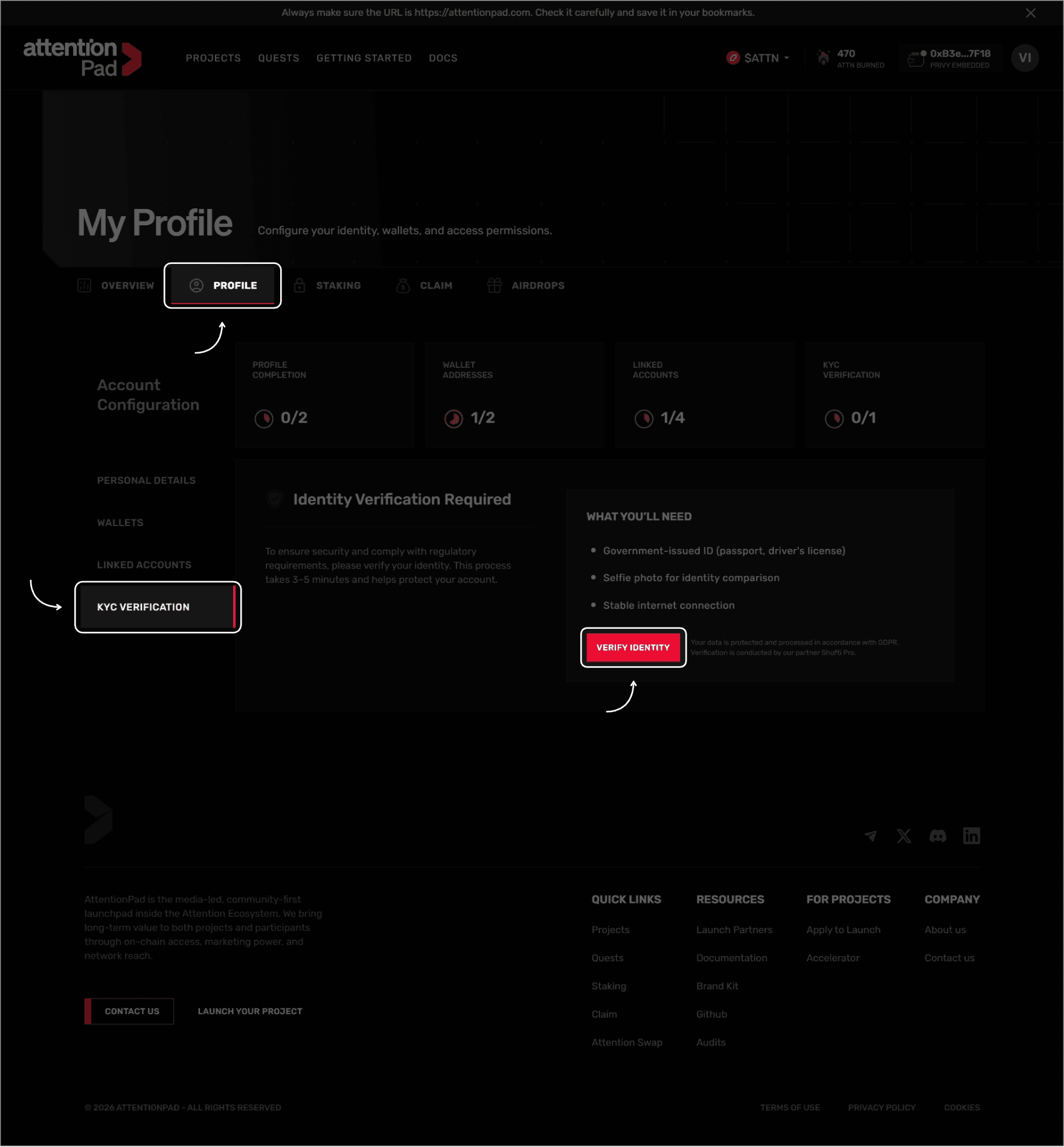
After signing in to AttentionPad, go to your account area and open the Profile tab.
From the Profile page, select KYC Verification from the account configuration menu.
Step 2: Review What You Need
Before starting the verification process, make sure you have the required items ready.
You will need:
- A government-issued ID, such as a passport or driver’s license.
- A selfie photo for identity comparison.
- A stable internet connection.
The verification process usually takes a few minutes to complete.
Step 3: Start Verification
Click Verify Identity to begin the KYC process.
You will be redirected from AttentionPad to the Shufti Pro verification flow. Follow the instructions shown by Shufti Pro and complete each required step.
During the process, you may be asked to upload or scan your identity document, take a selfie, and confirm that your information is correct.
Step 4: Complete the Shufti Pro Flow
Follow all on-screen instructions carefully.
Make sure that:
- Your ID document is valid and not expired.
- The document photo is clear and readable.
- Your face is clearly visible during the selfie step.
- You are in a well-lit environment.
- You complete the process using a stable internet connection.
If the verification cannot be completed, Shufti Pro may ask you to retry one or more steps.
Step 5: Return to AttentionPad
After completing the Shufti Pro process, return to your AttentionPad account.
Once your verification has been approved, your KYC status in your user account will change from Unverified to Verified.
After your account is verified, you will be able to participate in token sales, subject to any additional sale-specific requirements.
Verification Status
| Status | Meaning |
|---|---|
| Unverified | Your account has not completed KYC verification yet. You cannot participate in token sales. |
| Pending | Your verification has been submitted and is being reviewed. |
| Verified | Your identity has been successfully verified. You can participate in token sales, subject to sale requirements. |
| Failed / Rejected | Your verification could not be completed. You may need to retry or contact support. |
Troubleshooting
If you have trouble completing KYC verification:
- Make sure your ID document is valid and clearly readable.
- Use a well-lit environment when taking a selfie.
- Avoid glare, shadows, cropped documents, or blurry images.
- Check that your internet connection is stable.
- Use a supported browser and disable extensions that may interfere with camera access.
- Make sure your device camera permissions are enabled.
- Try again from a different browser or device if the verification window does not load correctly.