
Funding Your Account
Funding and cross-chain access
Before participating in token sales on AttentionPad, you need to make sure that the wallet you intend to use has enough funds to complete your contribution and pay any required network gas fees.
At the moment, AttentionPad does not provide a direct built-in fiat on-ramp. This means users cannot currently buy crypto directly inside AttentionPad using Stripe, Transak, or another embedded card-payment provider.
Instead, users can fund their wallet by transferring crypto from another wallet or by using external third-party services such as centralized exchanges or crypto on-ramp providers.
Funding Methods
You can fund your AttentionPad wallet in several ways.
| Method | Description |
|---|---|
| Transfer from another wallet | Send crypto from a wallet you already control to the wallet connected to AttentionPad. |
| Centralized exchange withdrawal | Buy or hold crypto on an exchange, then withdraw it to your AttentionPad wallet address. |
| Third-party on-ramp provider | Use an external on-ramp service to buy crypto and send it to your wallet. |
Finding Your Embedded Wallet Address
If your account was created using email, Google, X / Twitter, Discord, or another method other than Continue with a wallet, Privy automatically creates an embedded wallet for your AttentionPad account.
To fund this embedded wallet, you first need to copy its wallet address.
Go to your Profile page, open the Wallets tab, and find your embedded wallet address marked as Privy Wallet. You can copy the address using the copy button next to the wallet address.
The embedded Privy wallet is an EVM-compatible wallet. This means it is designed for EVM networks such as BNB Chain / BSC, Ethereum, Arbitrum, Base, Polygon, Avalanche, and other compatible networks.
Only transfer tokens or coins on supported EVM networks to this wallet. Do not send assets from non-EVM networks unless you are certain they are supported and compatible. Sending funds on the wrong network may result in permanent loss of funds.
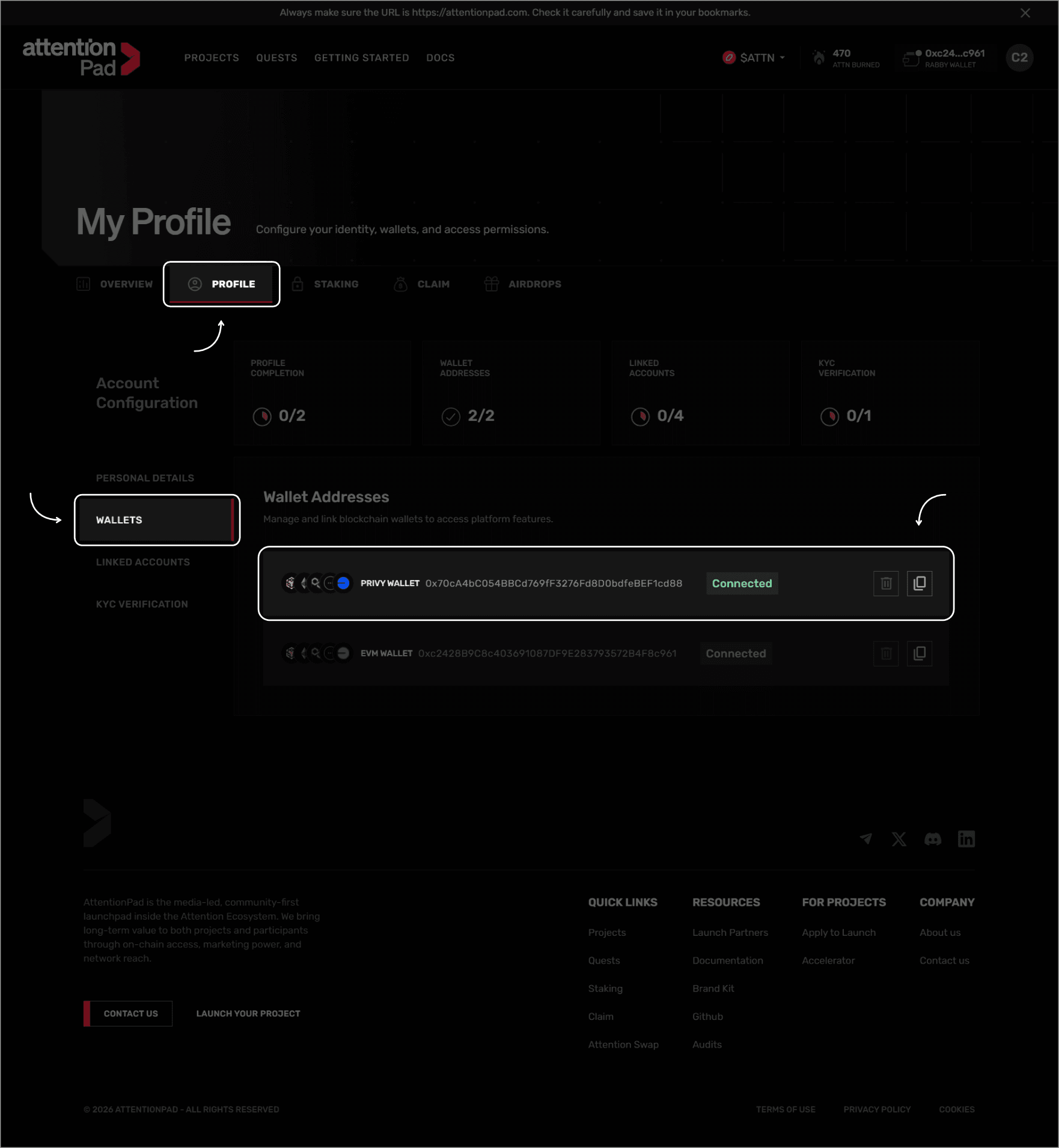
Use this address when transferring funds from another wallet, a centralized exchange, or a third-party on-ramp provider.
Before sending funds, always make sure that:
- The wallet address has been copied correctly.
- You are sending funds on an EVM-compatible network supported by the wallet.
- The asset and network are supported by the wallet and the service you are sending from.
- You have enough native gas tokens for future transactions.
- You send a small test transaction first if you are unsure.
- You wait for the test transaction to arrive before sending a larger amount.
Funding Your Embedded Wallet
After copying your embedded wallet address, you can fund it by sending supported crypto assets to that address.
The embedded Privy wallet is EVM-compatible, so make sure you only send assets on supported EVM networks. For example, if you withdraw from an exchange, carefully select the correct network before confirming the withdrawal.
Once the transfer is confirmed on-chain, your funds should become available in your wallet.
If you are sending funds for the first time, consider sending a small test amount first. After the test transfer arrives correctly, you can send the remaining amount.
Make sure you also keep enough native gas tokens in the wallet to pay network transaction fees when contributing to token sales, swapping assets, or interacting with supported on-chain features.
Funding an External Wallet
If you connect an external wallet, such as a browser extension or mobile wallet, you can fund that wallet directly.
To do this, send funds from another wallet, exchange, or on-ramp provider to the address of your external wallet.
Make sure the external wallet contains:
- The asset you want to use for your token sale contribution.
- The correct gas token for the network you intend to use.
- Enough balance to cover both the contribution and network transaction costs.
Using a Centralized Exchange
Many users fund their wallet by buying crypto on a centralized exchange and then withdrawing it to their own wallet.
Examples of major centralized exchanges include:
- Coinbase
- Kraken
- OKX
- Binance
- Crypto.com
- Bybit
These services are listed for reference only. AttentionPad does not control these platforms, does not guarantee their availability, and does not provide financial, legal, tax, or investment advice. Availability, supported assets, supported networks, fees, and withdrawal rules vary by country and provider. Always check that the exchange supports withdrawals to the network and wallet you intend to use.
Using a Third-Party On-Ramp Provider
Users may also choose to use third-party crypto on-ramp providers to buy crypto with fiat currency and send it to their wallet.
Examples of external on-ramp providers include:
- MoonPay
- Ramp Network
- Mercuryo
- Banxa
- Simplex
These providers are not integrated directly into AttentionPad at this time. If you use one of them, you are using an external service subject to its own fees, availability, verification requirements, supported assets, and terms of service.
Gas Tokens
Every blockchain transaction requires gas fees. These fees are paid using the native gas token of the network you are using.
For example:
| Network | Common Gas Token |
|---|---|
| BNB Chain / BSC | BNB |
| Ethereum | ETH |
| Arbitrum | ETH |
| Base | ETH |
| Polygon | POL / MATIC |
| Avalanche | AVAX |
The required gas token depends on the network used for the transaction. If you have the contribution asset but no gas token, your transaction may fail or remain unavailable until the wallet is topped up with the required gas token.
Token Sale Contributions
AttentionPad token sale contributions use the Bungee Exchange API for cross-chain swap and routing support.
Even when a sale collects funds in USDC on BNB Chain / BSC, users may be able to contribute using other tokens or coins from chains supported by the Bungee Exchange API.
This means that, depending on the available routes, a user may start with an asset on another supported chain and have the contribution routed into the required sale asset and destination network.
Before confirming a contribution, always review:
- The token you are spending.
- The source network.
- The estimated received amount.
- Any bridge, swap, or routing fees.
- The gas fees required on the source network.
- The wallet approval and transaction prompts.
Cross-chain routing depends on available liquidity, supported chains, supported assets, network conditions, and the routes available through the Bungee Exchange API at the time of the transaction.
Using Attention Swap
If you have already funded your wallet but want to swap assets before participating in a sale, you can use Attention Swap.
Go to the official Attention Swap page:
Attention Swap can be used to swap supported tokens and prepare your wallet before participating in a token sale.
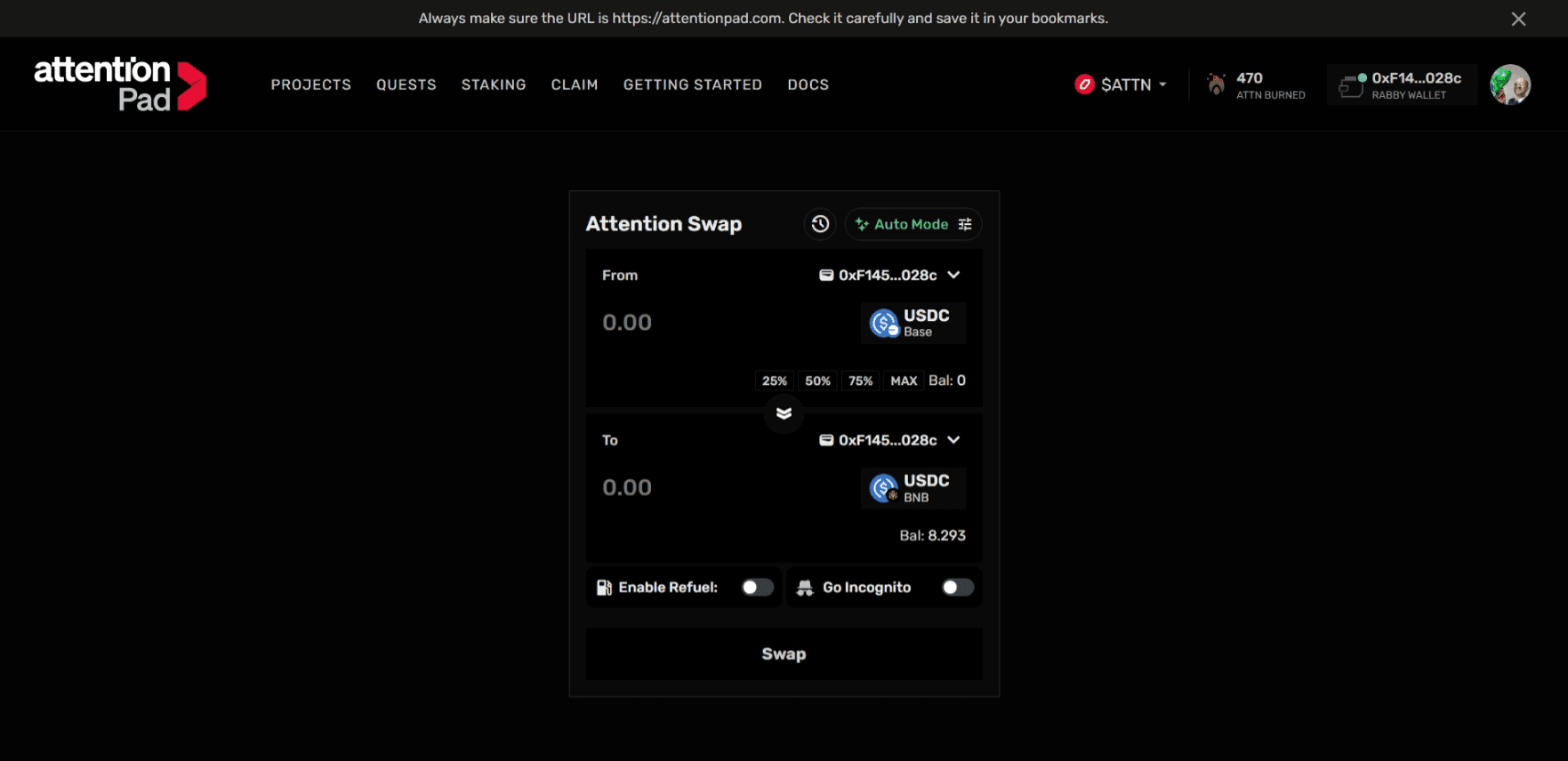
Before using Attention Swap, make sure your wallet has enough gas tokens for the network you are using.
Supported Chains
AttentionPad is designed for cross-chain participation, but supported networks may vary depending on the specific sale, asset, distribution setup, and routing options available at the time.
For the current flow, token sale contributions may be collected in USDC on BNB Chain / BSC, while Bungee Exchange enables routing from supported chains and assets where available.
Important Safety Notes
Crypto transactions are irreversible. Always check the wallet address, token, network, and transaction details before sending funds or approving a transaction.
AttentionPad does not control third-party exchanges, on-ramp providers, bridges, wallets, or routing providers. External services may charge fees, require identity verification, restrict certain countries, or change their supported assets and networks over time.
Never share your seed phrase or private keys with anyone. AttentionPad, Privy, Bungee, exchanges, and on-ramp providers will never need your seed phrase to process a normal transaction.